Hailuo 2.3
Hailuo 2.3 is VidGen's Hailuo AI image to video model for creators who already have a strong visual starting point and want an AI video generator that adds motion, atmosphere, and camera energy without rebuilding the scene from scratch. Upload one image, describe the movement you want, and Hailuo 2.3 turns that still frame into a short AI video clip. It supports Standard and Pro quality tiers, 6-second or 10-second outputs, and resolutions up to 1080p in supported combinations, making it a practical fit for concept animation, product visuals, social teasers, and short cinematic loops.
See How Hailuo 2.3 Animates a Still Frame
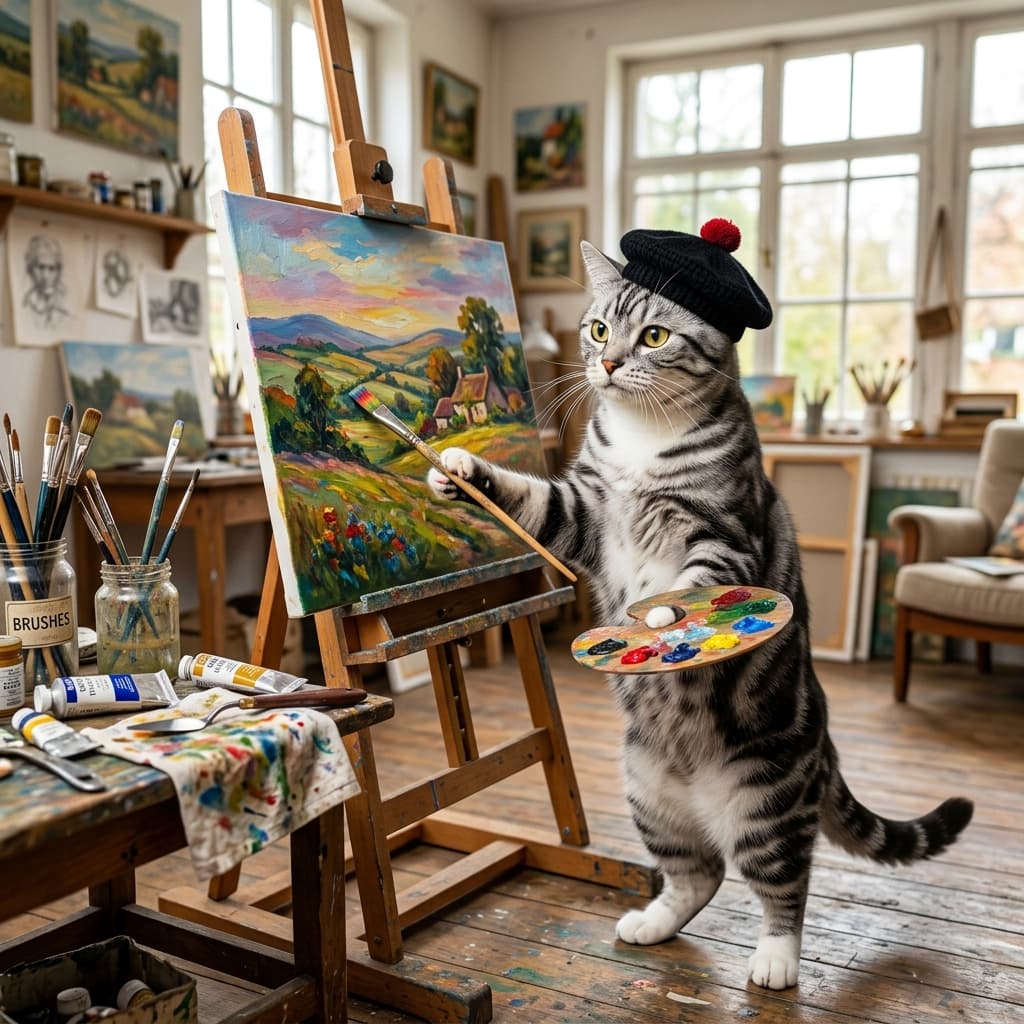
This demo uses VidGen's image to video sample assets: one square reference frame, a motion prompt, and the generated landscape video result.
Creative Input
A silver tabby American Shorthair cat wearing a black beret stands on its hind legs in a bright artist studio, painting a colorful landscape on a canvas. The cat dips its brush into a paint palette, then makes a careful brushstroke on the canvas. It steps back, tilts its head to examine the work, then adds another stroke with confidence. Paint tubes and brushes are scattered on a nearby table. Golden natural light streams through large windows. The camera starts on a close-up of the brush touching the canvas, then pulls back to reveal the full scene. Artistic, warm tones, shallow depth of field. Sounds of brush strokes on canvas, soft classical piano music playing in the background.
Output Result
How to Use Hailuo 2.3 for Image to Video
Step 1
Upload a Clear Reference Image
Choose the image you want to animate. The clearer the subject, composition, and lighting, the easier it is for Hailuo 2.3 to build convincing motion.
Step 2
Write a Motion Prompt
Describe how the scene should move, what the camera should do, and what atmosphere you want. Specific motion, pacing, and lighting cues usually lead to stronger results.
Step 3
Choose Tier, Duration, and Resolution
Select Standard or Pro mode, your target clip length, and the best compatible resolution. Use lighter settings for testing and higher settings when you are ready for a polished export.
Step 4
Generate, Review, and Download
Start the generation job, preview the animated result, and download the finished short-form video once the movement and pacing look right.
Common Questions
What is Hailuo 2.3?
Hailuo 2.3 is an AI image to video model that turns one still image into a short motion clip. In VidGen, it is best used when you already have a strong visual frame and want to add movement, camera feel, and atmosphere.
How do I use Hailuo AI image to video?
Upload a clear reference image, write a motion prompt, choose your quality tier, duration, and resolution, then start the generation. Hailuo 2.3 works best when the subject, camera movement, and mood are described clearly.
Do I need both an image and a prompt?
Yes. The image provides the visual anchor, while the prompt tells the model how the scene should move, what camera behavior to simulate, and what kind of atmosphere or motion to create.
What Hailuo AI prompts work best?
The strongest prompts explain subject motion, camera movement, pacing, lighting, and atmosphere. Instead of writing only "make it move," describe actions like slow dolly-in, hair blowing in wind, soft golden-hour light, or subtle product rotation.
What settings can I control in Hailuo 2.3?
In VidGen, you can choose the generation tier, output duration, and output resolution. These combinations help you balance speed, cost, and final visual quality.
Is 1080p always available in Hailuo 2.3?
No. Some duration and resolution combinations are restricted. For example, 10-second output does not support 1080p, so 768p is the compatible choice for longer clips.
What is Hailuo 2.3 pricing in VidGen?
Hailuo 2.3 uses VidGen's credit-based pricing model. The total cost depends on the tier, clip length, and resolution you choose, so shorter or lower-cost settings are better for testing, while higher settings are better for final output.
Is Hailuo 2.3 a good AI video generator?
Yes, especially if your workflow starts from an existing image. Hailuo 2.3 is a strong option for stylized scenes, product visuals, portraits, and short teasers, though it is more specialized for image to video than broader prompt-first video generators.
How is Hailuo 2.3 different from Veo 3.1?
Hailuo 2.3 is focused on image to video animation from a supplied still image. Veo 3.1 covers broader cinematic video generation workflows, including prompt-led generation and different composition styles.
Explore Other AI Models on VidGen
Animate Your Image with Hailuo 2.3
Upload one still image, write a motion prompt, and let Hailuo 2.3 turn it into a short AI image to video clip.