Nano Banana 2
Nano Banana 2 is VidGen's more flexible Nano Banana AI workflow for text to image and image to image creation. Choose it when you want broader aspect-ratio control, up to 14 reference images, and output options from 1K to 4K while still keeping a fast prompt-to-result workflow for concepts, campaigns, product visuals, and character-led creative work.
From Prompt to a Cinematic Product Hero
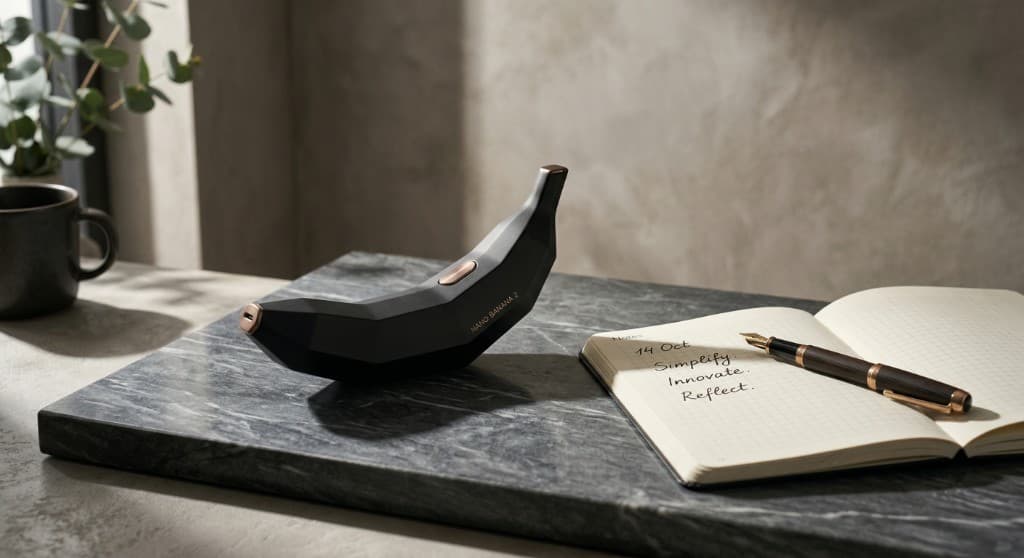
A text-to-image example: one detailed creative brief and one polished still — minimalist set design, premium materials, and dramatic side light.
Prompt
Minimalist, high-end advertising photograph. A matte-black, geometric low-poly banana-shaped device with subtle bronze or rose-gold accents, engraved with small elegant lettering reading NANO BANANA 2, placed on a thick slab of dark grey veined marble. Beside it, part of an open classic notebook with grid paper and a premium fountain pen with gold trim; soft handwritten notes suggesting calm planning. Background: warm soft grey textured wall, dramatic side lighting with long defined shadows, a ceramic mug and a small plant softly blurred. Elegant, peaceful, professional, cinematic, quiet-luxury tech mood. No extra readable logos or watermarks beyond the product name on the device.
Generated image
How to Use Nano Banana 2?
Step 1
Choose Text to Image or Image to Image
Start with Text to Image when you want to generate from a prompt, or switch to Image to Image when you want Nano Banana 2 to follow one or more reference visuals.
Step 2
Add a Clear Prompt, References, and Output Settings
Write a direct prompt for subject, mood, composition, and editing goal, then add reference images if needed and choose the aspect ratio, resolution, and output format that match your target use case.
Step 3
Generate, Compare, and Refine
Review the first output for consistency, styling, and detail, then keep refining the prompt or reference mix until the image is strong enough for social, marketing, product, or campaign use.
Common Questions
What is Nano Banana 2?
Nano Banana 2 is an AI image generation and editing model designed for both prompt-first creation and image-to-image workflows. In VidGen it is positioned as a more flexible Nano Banana workflow when you want more aspect ratios, more reference images, and higher output options than a lighter fast-edit model.
How do I use Nano Banana 2?
Choose Text to Image if you want to generate from a prompt, or Image to Image if you want to guide the result with one or more source images. Then describe the subject, style, and intended edit clearly, choose the aspect ratio and resolution you want, and refine after the first result.
Is Nano Banana 2 free?
Nano Banana 2 is not an unlimited free model, but VidGen gives new users free credits so you can test the workflow before moving into larger batches or higher-resolution output.
What is Nano Banana 2 pricing?
Nano Banana 2 pricing depends on the platform you use. In VidGen it follows the product's credit-based pricing model, and the total cost depends on the selected resolution, such as 1K, 2K, or 4K.
Can Nano Banana 2 do image-to-image editing?
Yes. Nano Banana 2 is a strong fit for image-to-image AI workflows when you already have a source visual and want to change mood, styling, composition cues, or product presentation while keeping tighter control than a pure text-only workflow.
How many reference images does Nano Banana 2 support?
In VidGen, Nano Banana 2 supports up to 14 reference images. That makes it a better fit for multi-reference briefs where you want to mix subject cues, product angles, material references, and style direction in one generation flow.
Does Nano Banana 2 support 4K output?
Yes. Nano Banana 2 supports multiple output resolutions in VidGen, including 1K, 2K, and 4K. Lower resolutions are useful for testing ideas faster, while higher resolutions make more sense when you are moving toward a final visual.
How is Nano Banana 2 different from Nano Banana Pro?
Nano Banana Pro is better positioned for fast-turnaround editing and quick creative exploration. Nano Banana 2 is the stronger choice when you need broader aspect-ratio control, more reference-image support, and a more expandable workflow for polished multi-input image generation.
Is Nano Banana 2 good for character consistency AI workflows?
Yes. Nano Banana 2 is a practical option for character consistency AI work when you use multiple reference images and keep your subject description, styling cues, and framing direction stable across iterations.
Is Nano Banana 2 related to Gemini 2.5 Flash Image?
Many users search Nano Banana 2 alongside Gemini 2.5 Flash Image or Google Nano Banana terms because they are comparing similar image-generation ideas. In VidGen, this page is specifically about the Nano Banana 2 workflow available inside the product.
When did Nano Banana 2 come out?
Google introduced Nano Banana 2 on February 26, 2026. Actual availability can still vary by product and region, so in practice users may see it roll out at different times across Gemini, Search, AI Studio, and other Google surfaces.
Try Nano Banana 2 for Flexible Image Generation
Use Nano Banana 2 in VidGen for text to image, image to image, multi-reference editing, and higher-resolution output with free credits to get started.