Nano Banana 2 Lite
Nano Banana 2 Lite, officially Gemini 3.1 Flash Lite Image, is Google's speed- and cost-focused model for 1K image generation and editing. In VidGen, create from text or edit with up to four reference images, choose from 14 fixed aspect ratios or let the model select the ratio automatically, and optionally use priority processing. It is built for fast visual iteration, while Nano Banana 2 remains the better fit when you need 2K or 4K output, broader reference handling, or Google Search grounding.
Nano Banana 2 Lite Text-to-Image Example
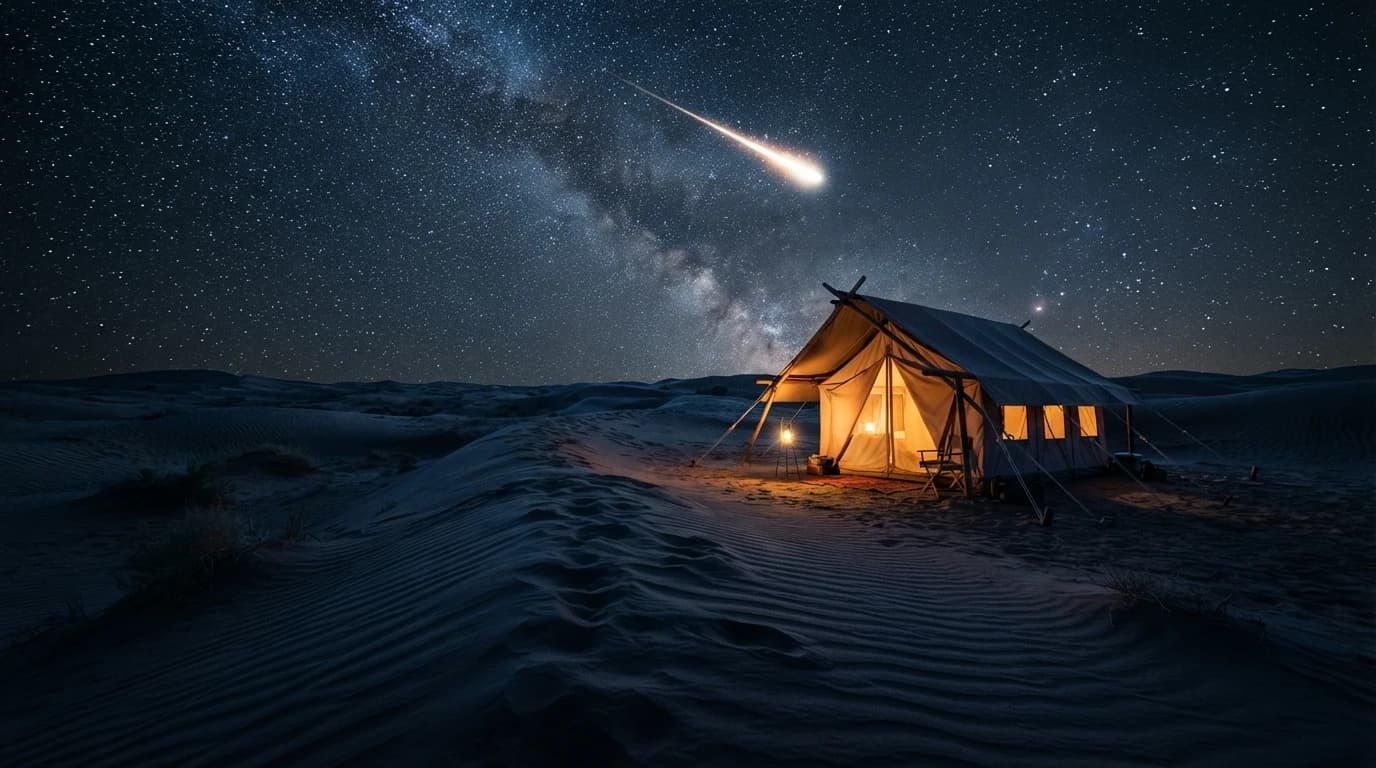
This real 16:9 Nano Banana 2 Lite output uses one prompt to create a warm canvas tent beneath a cold blue desert night, with dune leading lines, a dense star field, and a shooting star.
Prompt
A glowing canvas tent under a starry desert sky, camera low behind wind-carved dune ridges leading to the tent, warm lantern glow contrasting cold blue night sand, shooting star streak, cinematic composition, ultra-detailed
Generated Image
Nano Banana 2 Lite Features in VidGen
Google's Efficiency Specialist
Google positions Lite as the fastest and most cost-efficient model in the Nano Banana family, optimized for low-latency image generation and editing.
Text-to-Image and Guided Editing
Generate a new visual from a prompt or upload existing images and describe the changes you want in natural language.
Fixed 1K Output
Lite is optimized for 1K output and does not offer 2K or 4K, keeping its role clearly focused on fast iteration.
Up to Four References in VidGen
Use as many as four source images in VidGen for prompt-guided edits, restyling, and variations of existing visuals.
Fast Local Edits
The model is designed for quick changes such as swapping colors, changing backgrounds, and turning visual elements into sticker-like assets.
14 Aspect Ratios or Automatic Selection
Choose a fixed landscape, portrait, square, panoramic, or extra-tall format, or let the model determine the output framing from the prompt and reference images.
How to Use Nano Banana 2 Lite
Step 1
Choose Text to Image or Image to Image
Start from a prompt for a new image, or open Image to Image when you want to edit or restyle existing visuals.
Step 2
Write the Prompt and Add References
Describe the subject, composition, lighting, style, or exact edit. For guided editing, upload up to four source images and state clearly what should change or remain.
Step 3
Select the Ratio and Generate
Choose one of 14 fixed aspect ratios or automatic ratio selection, optionally enable priority processing, and generate the 1K result. Refine the prompt for another fast variation if needed.
Nano Banana 2 Lite Questions
What is Nano Banana 2 Lite?
Nano Banana 2 Lite is the product name for Google's Gemini 3.1 Flash Lite Image model. Google designed it as the speed- and cost-focused member of the Nano Banana family for 1K image generation and editing.
How is Nano Banana 2 Lite different from Nano Banana 2?
Lite focuses on low latency, lower cost, and 1K output. Nano Banana 2 is the broader general-purpose option when you need 2K or 4K images, more demanding multi-reference work, or Google Search grounding.
Can Nano Banana 2 Lite generate and edit images?
Yes. Open Text to Image to create from a prompt, or Image to Image to upload source visuals and request changes with natural-language instructions.
What resolution does Nano Banana 2 Lite support?
Nano Banana 2 Lite outputs 1K images. Google documents 2K and 4K as unsupported for this Lite model, so choose Nano Banana 2 when higher resolution is required.
How many reference images can I upload?
VidGen currently accepts up to four reference images for Nano Banana 2 Lite. Google also notes that Lite is not optimized for reference-heavy or long multi-turn editing, so Nano Banana 2 is a better choice for those jobs.
Which aspect ratios are available?
VidGen supports automatic ratio selection as well as 1:1, 16:9, 9:16, 4:3, 3:4, 3:2, 2:3, 5:4, 4:5, 21:9, 4:1, 1:4, 8:1, and 1:8. With automatic selection, no fixed ratio is preset; the model uses the prompt and any reference images to determine suitable output framing.
Does Nano Banana 2 Lite support Google Search grounding?
No. Google's image-generation documentation lists Google Search grounding as unsupported for Nano Banana 2 Lite. Use Nano Banana 2 if search-grounded generation is important.
Does Nano Banana 2 Lite mark AI-generated images?
Google states that generated images include an imperceptible SynthID watermark and C2PA content credentials for AI provenance.
Create Faster with Nano Banana 2 Lite
Generate or edit 1K images with Nano Banana 2 Lite in VidGen using a prompt, up to four references, and flexible aspect ratios.