Kling AI Avatar 2.0
Kling AI Avatar 2.0 turns one portrait and a recorded voice track into a talking-avatar video. In VidGen, upload a clear image and 5–300 seconds of audio, then use a guidance prompt to describe the expression, head movement, and visible body motion you want. Choose 720p or 1080p for presenter videos, product explainers, lessons, virtual hosts, and localized content. This workflow uses your uploaded audio; it does not generate a voice from text.
See a Real Kling AI Avatar 2.0 Result
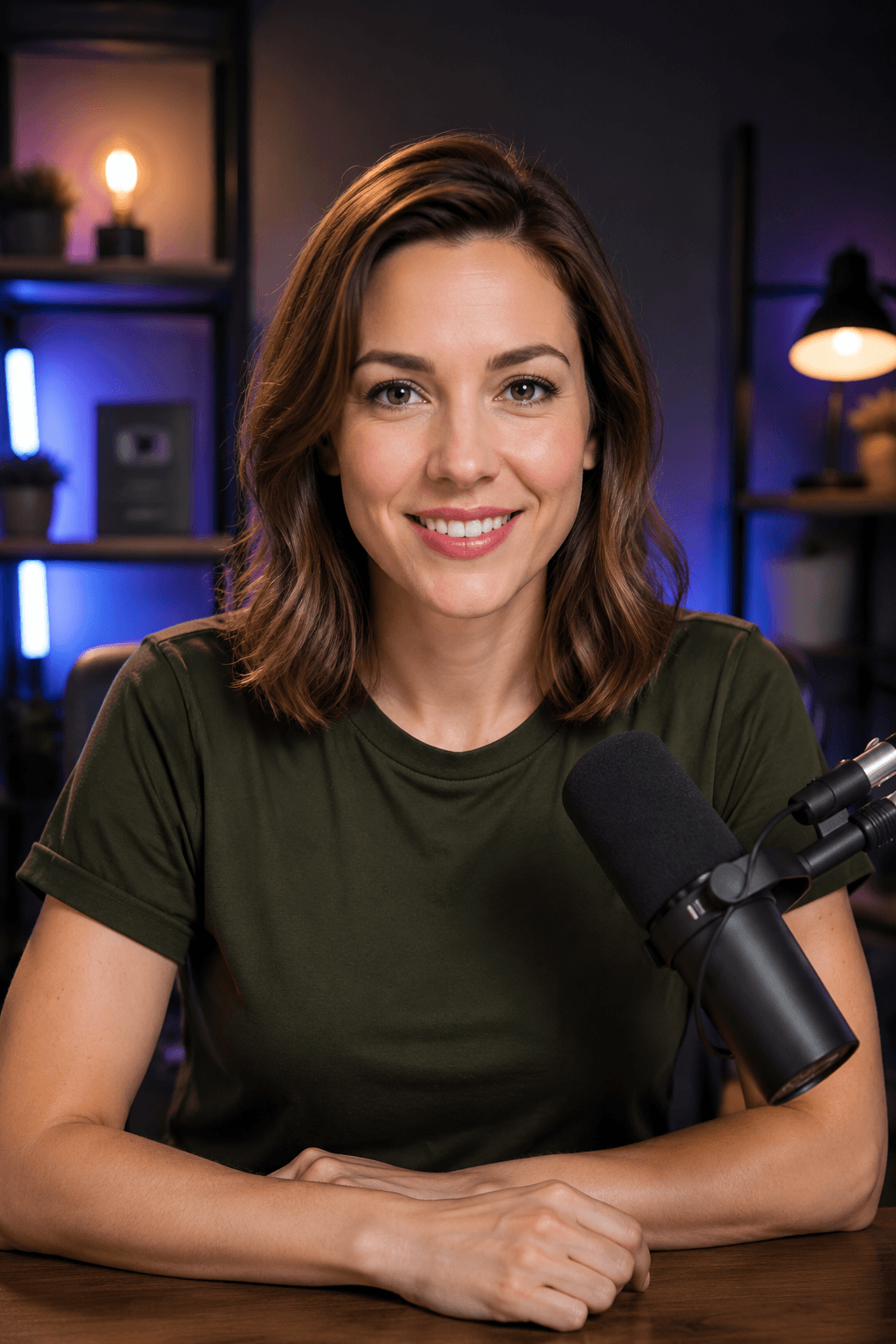
This real VidGen example uses a podcast-host portrait, a 21-second voice track, and the prompt below. Kling AI Avatar 2.0 generates a 720p talking-avatar video with natural lip sync, facial expression, and head movement.
Portrait, Audio, and Prompt
A person talking naturally with subtle facial expressions and head movements.
Talking-Avatar Video
Kling AI Avatar 2.0 Key Features
Create a Talking Avatar from One Photo
Start from a single portrait instead of filming a presenter. The model animates the visible person into a speaking performance guided by the supplied audio and prompt.
Audio-Driven Lip Sync and Performance
Use a prepared voice track to drive mouth movement and performance timing, keeping the generated video aligned with the length of the uploaded audio.
Prompt-Guided Expression and Motion
Describe the intended tone, facial expression, head movement, gestures, and energy so the performance better matches the message.
Up to Five Minutes of Audio
Generate from audio between 5 and 300 seconds, making the workflow useful for both short social clips and longer explainers or lessons.
720p and 1080p Output
Choose 720p for lower-cost drafts or 1080p Pro output when the final talking-avatar video needs more detail.
No Camera or Local Setup
Create the video in a browser with an image, audio file, and prompt without recording new footage or installing a local model.
Kling AI Avatar 2.0 Standard vs Pro
Standard — 720p
Use Standard for previews, social drafts, and routine talking-avatar content. VidGen currently charges 8 credits per second of input audio.
Pro — 1080p at 48 fps
Use Pro when cleaner detail and smoother final output matter. VidGen currently charges 16 credits per second of input audio.
What You Can Create with Kling AI Avatar 2.0
- Presenter videos and virtual-host clips made from a brand portrait and prepared narration.
- Product explainers, feature announcements, and e-commerce videos without filming a spokesperson.
- Training lessons, course introductions, onboarding messages, and internal communications.
- Localized talking-avatar versions that reuse the same portrait with separately prepared voice tracks.
- Creator updates, podcast teasers, social posts, and short-form commentary with a consistent on-screen identity.
- Character performances and storytelling clips where the prompt guides expression, gestures, and delivery style.
How to Use Kling AI Avatar 2.0
Step 1
Choose a Clear Portrait
Upload one well-lit image with a visible face and enough space for the expression, head movement, or upper-body gestures you want to generate.
Step 2
Upload the Finished Voice Track
Add 5–300 seconds of MP3, WAV, AAC, MP4, or OGG audio. Use clean speech with intentional pauses because the audio drives the timing of the performance.
Step 3
Describe the Performance
Write a prompt for tone, expression, eye contact, head movement, and visible gestures. Keep it consistent with the portrait framing and the purpose of the narration.
Step 4
Choose the Resolution and Generate
Select 720p Standard or 1080p Pro, review the credit quote based on audio duration, then generate and inspect lip sync, expression, and motion before downloading.
Kling AI Avatar 2.0 Questions
What is Kling AI Avatar 2.0?
Kling AI Avatar 2.0 is a talking-avatar model that combines one portrait, one audio track, and a guidance prompt to generate a speaking character video. It is designed for photo-to-talking-video creation rather than general text-to-video generation.
What do I need to create a Kling talking avatar?
Prepare one clear portrait, a 5–300 second audio file, and a prompt describing the desired expression and movement. VidGen accepts common image uploads and MP3, WAV, AAC, MP4, or OGG audio, then lets you choose 720p or 1080p.
How long can a Kling AI Avatar 2.0 video be?
The current VidGen workflow accepts audio from 5 seconds to 5 minutes. The output follows the supplied audio duration, and credits are calculated from that duration and the selected resolution.
How should I write the guidance prompt?
Describe performance rather than repeating the spoken script. Specify the mood, facial expression, head movement, eye contact, visible gestures, and energy level in direct language, such as calm instructor, warm smile, subtle nods, and restrained hand movement.
What kind of portrait works best?
Use a sharp, well-lit image with one clearly visible person, an unobstructed face, and enough room around the head and upper body for the motion you request. Extreme angles, covered facial features, or very small faces can make the result less predictable.
Does Kling AI Avatar 2.0 generate the voice?
Not in VidGen's current Kling avatar workflow. Upload the finished voice track you want the avatar to perform. This gives you direct control over wording, language, pacing, pronunciation, and speaker identity.
What is the difference between AI Avatar and Lip Sync AI?
Use Kling AI Avatar 2.0 when you are starting from a still portrait and want to create a new talking video. Use Lip Sync AI when you already have a face video and want to synchronize its mouth movement to replacement audio.
Should I choose 720p or 1080p?
Choose 720p to test a portrait, prompt, or voice track at lower cost. Choose 1080p Pro for the final export when additional detail and 48 fps output are more important.
How much does Kling AI Avatar 2.0 cost in VidGen?
The current rate is 8 credits per audio second for 720p Standard and 16 credits per audio second for 1080p Pro. The generator shows the live quote before you submit the task.
Explore Other AI Models on VidGen
Create a Talking Avatar with Kling AI Avatar 2.0
Turn one portrait and your prepared audio into a prompt-guided talking-avatar video in 720p or 1080p.