Wan 3.0 Video AI 视频生成器
Wan 3.0 Video 在 VidGen 的同一个模型表单中提供文生视频、首帧图生视频、首尾帧图生视频和 Omni Reference 四种创建方式。你可以生成 2 秒到 30 秒、480p/720p/1080p 的视频,按需开启音画同步,并通过图片、视频或音频参考控制人物、产品、场景、动作与声音。
A Blender, Elevated:Wan 3.0 Omni Reference UGC 广告
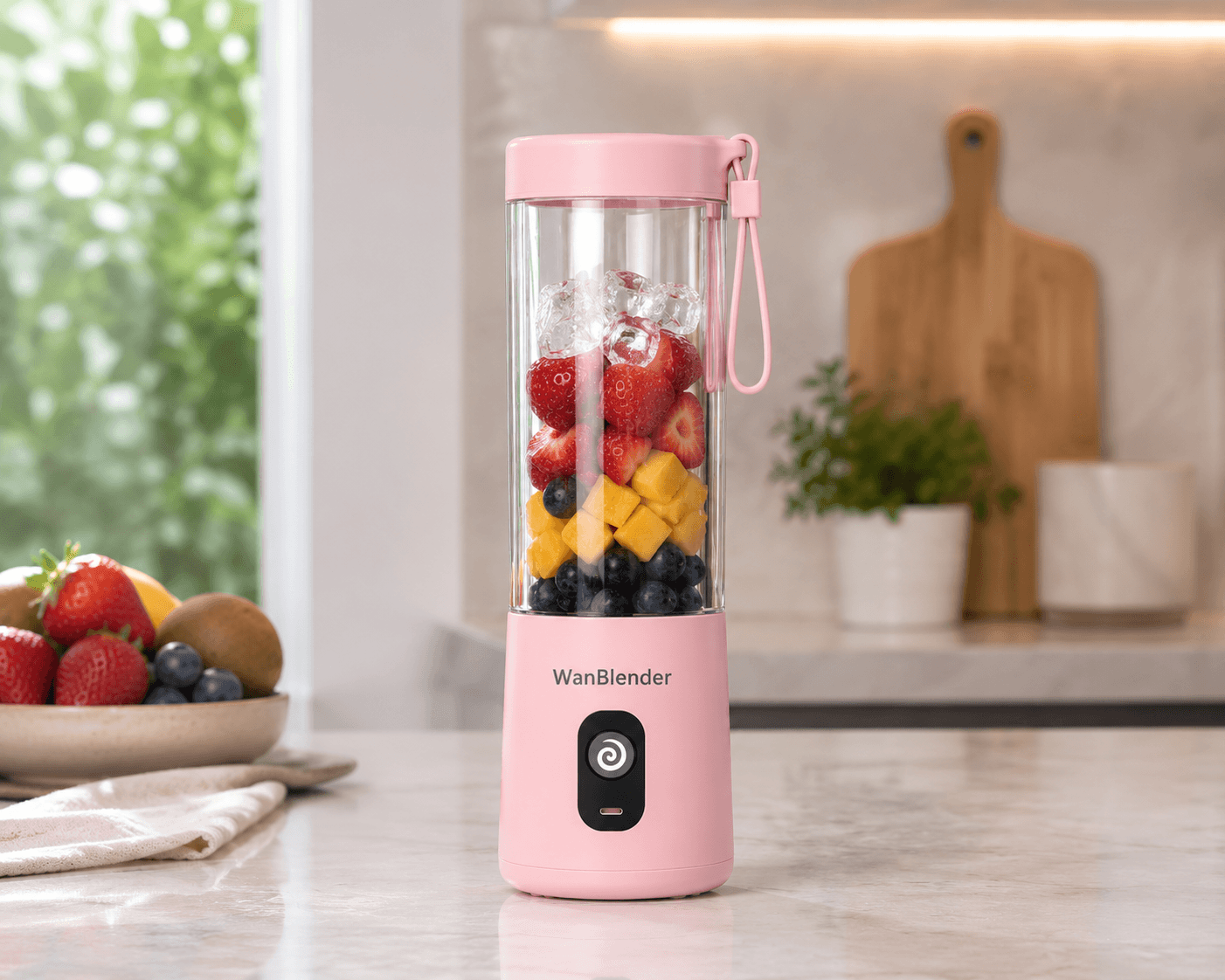
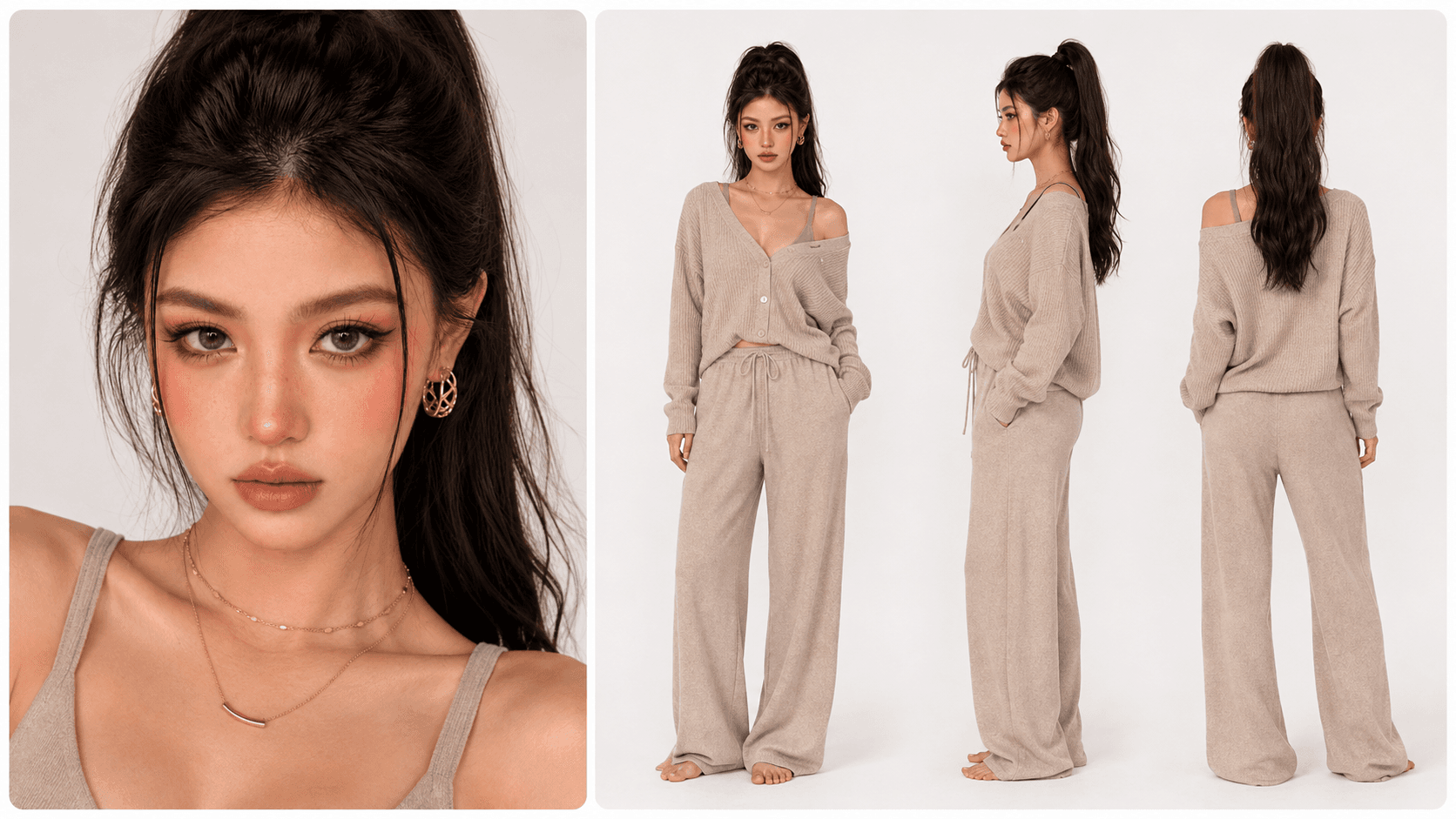
这个 Wan 3.0 官方示例组合两张参考图和一份详细导演提示词,在一支带英语对白和同步声音的 30 秒竖屏 UGC 广告中保持女性角色、便携式搅拌机和厨房环境一致。
提示词、生成参数和两张参考图
Create a 30-second premium UGC vertical ad with natural jump cuts, A-roll talking-to-camera shots and B-roll close-up product shots. [Image 1] is the portable blender product-in-kitchen reference. Keep one consistent blender: pale pink base and lid, clear straight cup, side strap, black power button, compact cylindrical shape, countertop lifestyle look, and fruit visible through the cup. Do not redesign the blender during the video. [Image 2] is the woman and outfit reference. Keep the same young Asian woman, high dark ponytail, face, slim body proportions, gold jewelry, warm beige knit cardigan worn loosely over a matching camisole, and matching loose lounge trousers. Scene: modern premium kitchen matching the product reference, soft daylight, clean stone countertop, fresh strawberries, banana slices, blueberries, mango pieces, and ice. Shot plan: 0–5s: Medium A-roll. The woman stands behind the kitchen counter holding the pink portable blender, speaking naturally to camera. She says: "I get asked how I make smoothies so quickly. Honestly, it’s this little blender." 5–9s: B-roll close-up of the blender upright on the countertop, already partly filled with fruit like the reference image. Her hands add strawberries, banana slices, blueberries and ice into the clear cup. Voice-over: "Fruit and ice go straight in." 9–13s: Close-up of the lid twisting on and her finger pressing the black power button. The blender stays vertical while fruit blends into a smooth pink smoothie. Voice-over: "One press, and it blends everything smooth." 13–18s: Medium handheld shot. She picks up the blender and smiles, holding it near her chest. She says: "It’s compact, powerful, and easy to clean." 18–23s: B-roll close-up. She pours the smoothie into a clear glass on the countertop. Voice-over: "I get a fresh smoothie without dragging out a full-size blender." 23–30s: Medium A-roll. She takes a sip, smiles warmly, and sets the glass beside the blender. She says: "Honestly, it’s the easiest healthy habit I’ve kept." Style: realistic premium UGC, handheld phone filming, soft natural light, shallow depth of field, gentle camera shake, realistic kitchen ambience, blending motor, pouring sound, casual room tone. No subtitles, no text overlays, no UI, no watermark, no extra people. Avoid extreme close-ups of fingers. Keep hands simple and natural. Keep the blender upright during blending. Keep the product shape, lid, button, strap and cup consistent throughout.
720p · 9:16 · 30 秒视频
Wan 3.0 Video 核心能力
一个 Wan 模型,四种创建方式
无需切换到不同的 Wan 模型,即可在文生视频、首帧动画、首尾帧过渡和 Omni Reference 创作方式之间选择。
2 秒到 30 秒视频
短时长适合测试动作和提示词;当内容需要完整动作、镜头变化或一段社交叙事时,可以一次生成最长 30 秒的视频。
Omni Reference 多模态参考
可组合图片、视频片段和音频参考,在一次生成中约束人物身份、产品外观、场景风格、动作表现或声音方向。
音画同步生成
需要同时生成画面与声音时可开启音频,然后把对白、环境声、音乐、音效与画面节奏作为一个整体进行检查。
480p、720p 或 1080p
可先用 480p 或 720p 迭代,再在需要更清晰细节时选择 1080p。Wan 3.0 Video 在当前支持的分辨率下输出 30 fps 视频。
标准或优先处理
标准处理使用 wan3.0-video;开启优先处理后会切换至高速版 wan3.0-video-prime,生成速度更快,并消耗更多积分。
Wan 3.0 Video 的四种创建方式
文生视频
从提示词开始,可选择自适应、16:9、9:16、1:1、4:3 或 3:4,并描述主体、动作、场景、镜头、光线、节奏和声音。
首帧图生视频
上传一张图片作为起始画面,再描述期望的动作与运镜。源图片负责确定初始构图和主要视觉身份。
首尾帧图生视频
当视频需要在两个视觉锚点之间运动时,同时提供起始图片和结束图片,适合揭示、变形或经过设计的转场。
Omni Reference
当人物一致性或多模态控制比固定单一首帧更重要时,可以同时使用多张图片、视频和音频作为参考。
Wan 3.0 Video 对比 Wan 2.7
Wan 2.7:聚焦帧与音频控制
VidGen 中的 Wan 2.7 适合 2 秒到 15 秒的文生视频、首帧、首尾帧和可选上传音频生成,支持 720p 或 1080p。
Wan 3.0:统一且时长更长
Wan 3.0 Video 将最长时长扩展到 30 秒,增加适合快速迭代的 480p,把四种创建方式整合在同一模型中,并增加支持图片、视频和音频输入的 Omni Reference。
应采用同条件对比
更多生成选项不等于每次 Wan 3.0 结果都一定优于 Wan 2.7。当画质是决定因素时,应使用相同提示词、画幅、分辨率、时长和源素材进行实测。
Wan 3.0 Video 适合哪些场景
- 需要最长 30 秒的社交叙事、预告片和短篇故事段落
- 通过参考图片或视频强化人物身份、服装与造型一致性的角色内容
- 需要保持产品形状、材质和视觉风格的产品演示与广告创意
- 使用首尾帧设计揭示、变形、转场或明确镜头终点的视频
- 同时参考视觉风格、动作示例、人声、音乐或音效的多模态场景
- 需要音画同步的创作者视频、表演片段和营销活动草稿
如何使用 Wan 3.0 Video
步骤 1
选择合适的生成器
只有提示词时进入文生视频;需要首帧、首尾帧组合或 Omni Reference 输入时进入图生视频。
步骤 2
选择创建方式
根据已有素材和镜头需要的控制方式,选择文生视频、首帧、首尾帧或 Omni Reference。
步骤 3
编写提示词并添加参考素材
描述主体、动作、镜头、光线、节奏、风格和声音。在参考模式中,还应说明每张图片、每段视频或音频分别负责控制什么。
步骤 4
设置时长、分辨率、画幅与音频
选择 2 秒到 30 秒、480p 到 1080p、是否开启音画同步,以及使用标准处理还是优先处理。在文生视频和 Omni Reference 模式中,还可以选择自适应或固定画幅。
步骤 5
生成、检查并迭代
重点检查人物身份、物体结构、动作、转场、音画同步和画面文字。每轮只调整一个变量,便于判断哪项提示词或设置真正改善了结果。
Wan 3.0 Video 常见问题
Wan 3.0 Video 是什么?
Wan 3.0 Video 是 Wan 系列的一体化 AI 视频模型。VidGen 已接入文生视频、首帧、首尾帧和 Omni Reference 创建方式,支持 2 秒到 30 秒、最高 1080p 输出和可选音画同步。
如何在 VidGen 使用 Wan 3.0 Video?
只有提示词时进入文生视频;需要首帧、首尾帧或 Omni Reference 时进入图生视频。选择 Wan 3.0 Video,填写提示词并添加参考素材,设置参数后即可生成。
Wan 3.0 Video 同时支持文生视频和图生视频吗?
支持。文生视频从文字提示词开始;图生视频可使用单张首帧、首尾帧组合,或通过 Omni Reference 组合图片、视频和音频。
Wan 3.0 Video 的 Omni Reference 是什么?
Omni Reference 是多模态参考模式。VidGen 最多接受 20 个参考素材:最多 10 张图片、5 个视频和 5 个音频。上传视频总时长不超过 15 秒,音频参考总时长不超过 15 秒。
Wan 3.0 Video 最长可以生成多少秒?
VidGen 支持 2 秒到 30 秒之间的任意整数时长。短时长适合快速迭代提示词;更长时长能让动作、运镜、对白或多个叙事节拍有更多展开空间。
Wan 3.0 Video 支持 1080p 和音频吗?
支持。你可以选择 480p、720p 或 1080p,并开启或关闭音画同步。Wan 3.0 Video 输出帧率为 30 fps。
可以选择哪些画幅比例?
VidGen 在文生视频和 Omni Reference 模式中提供自适应、16:9、9:16、1:1、4:3 和 3:4。首帧与首尾帧模式不显示画幅选择器,构图主要由上传的单帧或帧组合引导。
标准处理和优先处理有什么区别?
标准处理使用 wan3.0-video 标准版;开启优先处理后会切换到官方高速版 wan3.0-video-prime。Prime 与标准版的功能和画质一致,主要区别是端到端生成速度显著提升,因此会消耗更多积分。
Wan 3.0 Video 可以免费使用吗?
Wan 3.0 Video 使用 VidGen 积分,并非不限次数的免费生成。所需积分取决于分辨率、时长以及是否开启优先处理,请在提交生成前查看表单中的当前预估。